Hacking the Tesco Clubcard for Fun and Profit
Not really. There’s no profit here, and no hacking. A small and boring Apple Wallet workaround for Tesco’s App Store region problem.
My daughter left the US to study at Trinity in Dublin for the next four years. One of the slightly ridiculous problems she ran into was the Tesco Clubcard.
Tecos is a large retail chain in the UK and Ireland. She has a perfectly valid Tesco Ireland Clubcard account. The problem is the Tesco Ireland app isn’t available through the US App Store. Tesco has chosen to make the Irish app region-specific.
Dunnes Stores, incidentally, has been fine. Their app was available to her without changing anything ¯\_(ツ)_/¯
There are ways around the Tesco problem. You can change the country on your Apple account or create a second Apple ID for Ireland. You could also join Tesco’s product or engineering team, change the app’s regional availability, and then quit. All of these feel like too much effort just to scan a grocery loyalty card.
So I went down a different rabbit hole: figure out what Tesco is actually putting in the barcode and create our own Apple Wallet pass.
A note before going further: this isn’t a Tesco-supported procedure. It is based on examining how Tesco Clubcard barcodes are encoded and googling. Test it before depending on it.
These steps are focused on Apple Wallet but it also works for Google Wallet but check first to see if the Tesco app is inaccessible first.
Working out the barcode
A Tesco Clubcard number looks something like this:
634000010242051064
That’s an example number, not a real one.
Older reverse-engineering of Tesco Clubcards found that the barcode value wasn’t the complete Clubcard number. Instead, the apparent formula was:
979+ the last 13 digits of the Clubcard number
Using the example:
- Clubcard number:
634000010242051064 - Last 13 digits:
0010242051064 - Add 979:
9790010242051064
So the value we want the checkout scanner to see is:
9790010242051064
Older discussions described Tesco using Code 128 barcodes. More recent Tesco digital Clubcards appear to use Aztec barcodes instead.
That’s the square barcode with the little bullseye in the middle. It isn’t a QR code.
I was able to examine an actual Tesco Clubcard Aztec code and its decoded value also followed the 16-digit 979… pattern. That makes the old transformation considerably more convincing, although Tesco does not mention this algorithm.
So my working assumption is:
- 18-digit Clubcard number
- Take the last 13 digits
- Put
979in front - Encode those 16 digits as an Aztec barcode
- ???
- Profit
Creating the Apple Wallet card
If you have an Apple Developer account you can create and sign your own .pkpass.
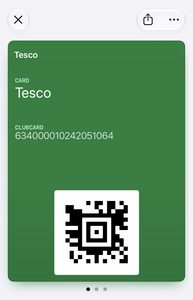
Most people obviously don’t have one. A much more accessible option is WalletWallet.
It lets you make an Apple Wallet pass from a barcode without having to set up Apple’s developer infrastructure. It also works in the browser without sending card data to server.
For this example I would create a pass using:
- Barcode type:
Aztec - Barcode value:
9790010242051064 - Card title:
Tesco Clubcard
I’d also put the normal Clubcard number somewhere visibly on the pass:
- Clubcard:
634000010242051064
That way the original number is still available if it ever needs to be entered manually.
WalletWallet then produces the Wallet pass, which is downloaded to your computer. From there you can text, email, or AirDrop it to your phone and add to Apple Wallet.
Apple Wallet supports Aztec as a native pass barcode format.
One thing that initially confused me
If you experiment with Aztec barcode generators, the generated barcode may not look exactly like Tesco’s.
For example, the center bullseye or overall dimensions can vary depending on whether the encoder uses a compact or full Aztec symbol and what error correction settings it selects.
That doesn’t necessarily change the data. The important test is that the resulting barcode decodes to exactly:
9790010242051064
and, ultimately, that a Tesco checkout scanner accepts it.
I’m trying to reproduce Tesco’s own compact-looking Aztec format as closely as practical, but I wouldn’t assume a visually different Aztec code is wrong simply because the squares don’t match pixel-for-pixel.
Why do this?
I need to do something else thats a bit time-sensitive and I am procrastinating. After that, I did not want to mess with my daughter’s Apple account from 3,183 miles away just for Tesco.
Her phone and Apple ID remain US-based. No second Apple ID. No App Store country switching. No carrying a separate plastic loyalty card.
The Tesco Clubcard just sits in Apple Wallet like it should have in the first place.
Again, this isn’t an officially documented Tesco mechanism. Tesco could change the barcode encoding at any point. But the older technical work, the current Aztec barcode format, and the fact that this worked suggest this is a good approach in the future.